
Your project stays private by default. We do not publish or disclose anything about the work we do for our clients. You do not need to ask for it. How we keep it confidential
When an automatic conversion is not enough, an engineer builds the model by hand. Send us what you have: a drawing, a sketch, photos, a 3D scan or a mesh. We return a CAD model in the format your workshop, printer or software needs.
Will I see the model before delivery? With Guaranteed result by an engineer, yes: you get a screenshot before the files are handed over. With Priority conversion the result comes straight from the automatic conversion, and you can ask an engineer a question about it on the order page. Fully automatic conversions usually come without a screenshot.
You send: Paper drawings, scans of hand sketches (even on a napkin), or 2D files such as DWG, DXF or CorelDRAW.
You get: A solid CAD model of each part and of the assembly; on request, files for production and assembly drawings.
Formats: STEP or another neutral format, or a native CAD format (see below).
Examples: Wristband: from a sketch to a product model; Centrifugal pump: reverse engineering for modernization; Large oil pump: CAD model and rendering; Dassault Falcon 7X scale model made of flat parts; KV-85 tank scale model; T-72 tank scale model
You send: One or more photos, screenshots or a video of the object. Add any dimensions you know.
You get: A 3D model that follows the shape seen in the images. The more views you send, the closer the model will be to the real object: every hidden side has to be reconstructed, and good images reduce guesswork.
Formats: A CAD format for production, or a mesh format for visualization and printing.
You send: A polygon mesh (for example STL, OBJ or PLY) or a point cloud. Very large scans with billions of points are fine. A mesh made in 3ds Max or Blender or bought in an online store works too.
You get: A solid or NURBS model with clean surfaces that CAD software and CNC machines can work with. Production needs exact geometry; a mesh only approximates it.
Formats: STEP or another neutral format, or a native CAD format.
Examples: Centrifugal pump: reverse engineering for modernization; Pickup body: master model for vacuum forming
Knowledge Base: STL to STEP, STL, STEP
You send: A lightweight viewing file from the CATIA world, 3DXML or CGR, when the original CAD model is lost. Add drawings or photos if you have them.
You get: An editable solid model.
Formats: STEP, CATPart or another CAD format you need.
You send: Any of the source data above, and the name and version of your CAD program.
You get: A parametric model with its feature tree, not just the geometry. We build it in the CAD program itself, in the version you will use. Versions of the same program differ, so please tell us which one you have.
Formats: Native formats such as CATPart or SLDPRT, made to order.
You send: A CAD model or a mesh.
You get: A mesh that prints the way it should. Preparing an STL looks simple, but it is easy to get wrong: too many triangles make the file heavy, too few make curved surfaces look faceted, and bad tessellation shows up on the print even at high detail.
Formats: STL.
Examples: KV-85 tank scale model; T-72 tank scale model
Knowledge Base: STL, STEP to STL
You send: Drawings, sketches or a 3D model of a product made of flat parts: metal, acrylic, plywood and similar sheets.
You get: A model that takes the material into account, parts laid out on sheets to save material, and a design that follows the cutting method (laser, plasma, milling) and the next steps such as welding or riveting. On request, assembly drawings.
Formats: DXF or DWG for cutting, CDR if needed.
You send: MRI data. We agree on the input format with you before the work starts.
You get: A 3D model for teaching, for making prosthetics or for life-size 3D printing.
Formats: Common polygon mesh formats or a point cloud.
You send: A CAD model or a mesh, and a description of the views you need.
You get: Realistic images or a turntable video. We also render heavy industrial objects: scenes of 30 to 40 million polygons.
Formats: Images or video, as agreed.
Examples: Wristband: from a sketch to a product model; Large oil pump: CAD model and rendering; Gemstone globe: CAD models and rendering
Most of our work is engineering, so the finished model is usually a solid or NURBS model in STEP, IGES or Parasolid, or in a native CAD format made to order. We make polygon meshes when the task needs them, for example for 3D printing or visualization. Not sure which format to ask for? Tell us what software or machine will use the file, and we will suggest one. See also the list of formats.
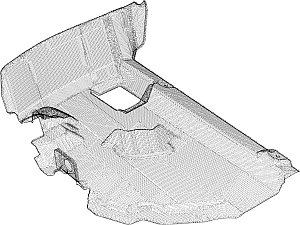
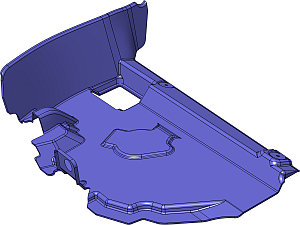
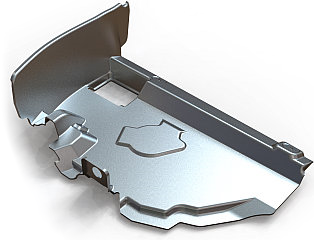
Some projects we can describe without names: private modifications for Tesla cars, parts for discontinued Chrysler models, car design from scratch, and models for prototypes made from sketches.
Shown with permission:
Upload your files on the order page and describe the task in the comments. An engineer will estimate the work and tell you the price and the time. If the result does not suit you, we refund the payment. By default we do not publish anything about your project.


